

Most agents don’t lose leads because their marketing is bad. They lose them because nobody followed up on Tuesday. A lead fills out a form, the agent is at a showing, and by Thursday the person has already talked to someone else.
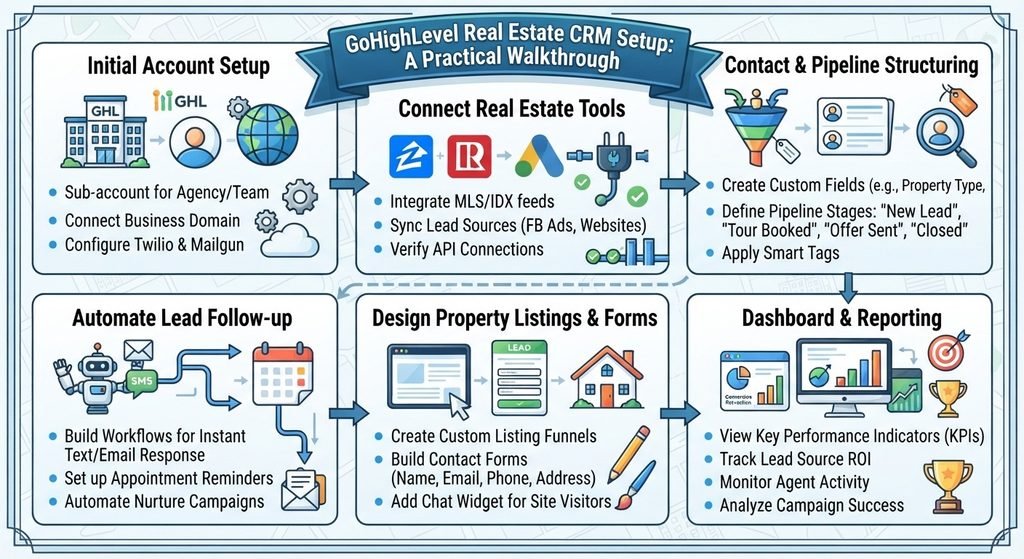
A proper GoHighLevel real estate CRM setup can fix that. Out of the box, GHL is a blank canvas, which is both its strength and the reason many people give up on it in week two. Here’s how I’d handle a GoHighLevel real estate CRM setup from scratch.
Start with a clean sub-account
If you run an agency or a team, give each agent or brokerage its own sub-account. This keeps contacts, phone numbers and reports separate. If you’re a solo agent, you still want one dedicated sub-account instead of mixing everything with other businesses.
Before anything else, fill in the business profile: name, address, time zone, logo and license number. The time zone matters more than people think. Your follow-up automations will fire at the wrong hours if it’s wrong.
Also check whether a real estate snapshot is available. A snapshot is a prebuilt package of pipelines, workflows and forms you can import. It saves hours, but treat it as a rough draft and edit it to match how you actually work.
Build your pipelines
A pipeline is the path a contact takes from first touch to closed deal. Real estate needs at least two, because buyers and sellers behave differently.
Buyer pipeline
- New lead
- Contacted
- Pre-approval in progress
- Actively searching
- Showing scheduled
- Offer submitted
- Under contract
- Closed
- Lost / long-term nurture
Seller pipeline
- New lead
- Listing consultation booked
- Consultation done
- Listing signed
- Active on market
- Under contract
- Closed
- Lost / long-term nurture
Keep stages simple. If you have fourteen stages, you will stop updating them. A “long-term nurture” stage is worth keeping, since many leads aren’t ready for six months or a year and you don’t want them buried.
Create custom fields that actually help
The default contact fields won’t tell you much about a buyer. Add custom fields for the things you ask on every first call:
- Buyer or seller
- Budget range
- Preferred areas
- Bedrooms and bathrooms
- Pre-approved (yes/no)
- Timeline to move
- Property type
- Current home address (for sellers)
- Lead source
Use dropdowns where you can. Free-text fields get messy fast, and you can’t filter or automate on messy data.
Set up lead sources and tracking
Every lead should have a source: Zillow, Facebook ads, Google, open house, referral, your website, and so on. Without this, you can’t tell which channel is worth the money.
Connect your forms and landing pages so the source is tagged automatically. Use tags too, for example “buyer-lead,” “seller-lead,” “open-house-oct.” Tags make it easy to build lists and trigger workflows later.
Capture leads with forms and landing pages
You need a way to get people into the system. The common options:
- Website form or chat widget embedded on your existing site
- Home valuation landing page for seller leads
- Buyer inquiry page tied to a specific listing or neighborhood
- Open house sign-in form on a tablet or QR code
Keep forms short. Name, phone and email are enough to start. Every extra field lowers conversions. You can learn the rest on the phone.
Connect your phone, email and texting
Set up a dedicated business number inside GHL and complete the carrier registration process for SMS. Skip this and your messages may be blocked or filtered, which defeats the whole point. It takes some patience, but do it early in your GoHighLevel real estate CRM setup.
Next, connect your sending email with a custom domain and set up the proper DNS records (SPF, DKIM and DMARC) so your emails land in the inbox instead of spam.
Then turn on missed call text back. If you can’t pick up, the system sends a quick text like “Sorry I missed you, I’m with a client. What can I help with?” It’s a small feature that wins back a surprising number of leads.
Build the core workflows
Workflows are where GHL earns its keep. You don’t need fifty of them. Start with these.
1. Speed-to-lead. When a new lead comes in, send an instant text and email, notify you on your phone, and create a task to call within five minutes. Speed matters more than anything else in lead conversion.
2. New lead follow-up sequence. If the lead doesn’t reply, follow up over several days with a mix of texts, emails and call tasks. Stop the sequence automatically when they respond or book.
3. Appointment reminders. Send reminders 24 hours and 1 hour before a showing or consultation. No-shows drop noticeably when people get a nudge.
4. Long-term nurture. For leads who aren’t ready, send monthly market updates, new listings or helpful tips. Keep it light.
5. Post-closing. Ask for a review a week after closing, then check in on the home’s anniversary. Past clients are your cheapest source of referrals.
Test each workflow with your own phone number and email before turning it on. Nothing is more embarrassing than a broken automation sending the wrong message to a real client.
Set up your calendar
Create calendars for buyer consultations, listing appointments and property showings. Connect them to your Google or Outlook calendar to avoid double bookings. Add buffer time between appointments and set your available hours honestly, so you don’t book yourself at midnight.
Share the booking link in your texts, email signature and social bios. Letting people book themselves removes a lot of back-and-forth.
Track what matters
Don’t drown in dashboards. Watch a handful of numbers:
- Leads by source
- Speed to first response
- Contact-to-appointment rate
- Appointments to signed agreements
- Cost per lead and cost per closing, if you run ads
Look at them weekly. If one source brings plenty of leads but none become appointments, you’ve learned something valuable.
Common mistakes in a GoHighLevel real estate CRM setup
- Overbuilding on day one. Launch with the basics and improve as you go.
- Skipping SMS registration. Your texts won’t deliver reliably.
- Never cleaning the data. Duplicates and missing fields wreck automations.
- Over-automating. People can tell when every message is a robot. Mix in real calls and personal notes.
- Ignoring compliance. Get consent for texts and emails, include opt-out options, and follow your local rules on marketing and do-not-call lists.
Final thoughts
A good GoHighLevel real estate CRM setup doesn’t have to be fancy. It needs clear pipelines, clean data, fast follow-up and a few reliable workflows. Get those right and GHL quietly handles the repetitive work while you spend your time with clients and on showings.
Start small, test everything, and tweak every few weeks. The agents who get the most out of GHL are rarely the ones with the most complicated systems. They’re the ones whose systems actually run. For more information visit activepropertycare.com